Minimum Deposit, UPI And USDT Ways To Add Money In Jai Club
A Jai Club deposit starts at Rs. 100 through UPI or $10 (10 USDT) through crypto, and a single UPI payment can go up to ₹50,000. Money usually shows in your Balance as soon as the payment goes through, so you can join a Win Go or Aviator round within minutes.
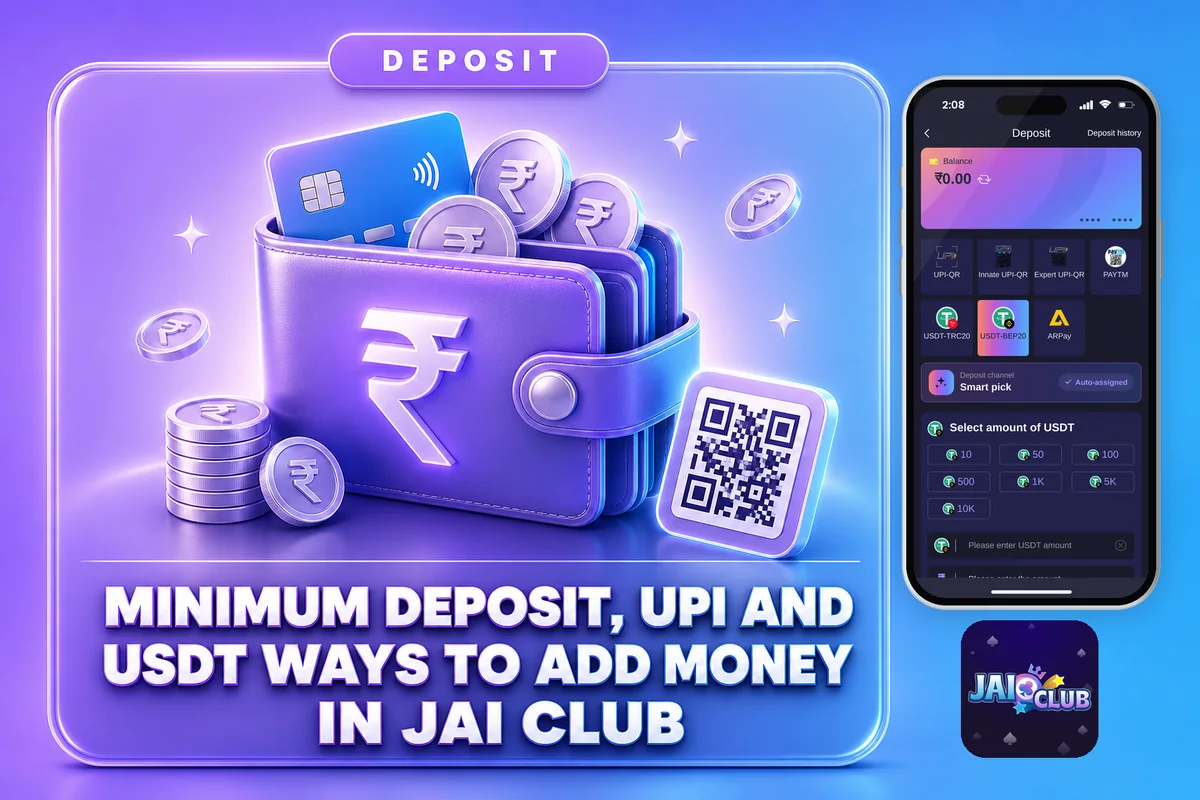
Registering costs nothing, but every round needs money in your Wallet. Below you will find the exact recharge steps, the limits for each method, the mistakes that stop money from showing up, and what to do when a payment leaves your bank but never reaches your account.
Only people who are 18 or older can play on Jai Club. Since money is at stake in these games, you may lose it, so deposit just the amount you can comfortably do without.
How To Make A Jai Club Deposit Step By Step
Deposits are made through the Wallet section of your account, and the process is identical on the Android app and the mobile site. Don’t have an account yet? Complete your new account setup first, as the Deposit button shows up only once you are logged in.
Open the app or the website and sign in with the mobile number and password you registered with.
Tap the Account or Wallet icon in the bottom menu.
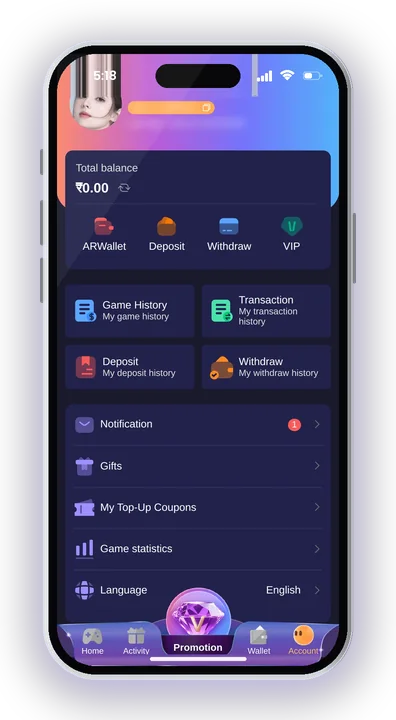
This opens the payment page with all available methods.
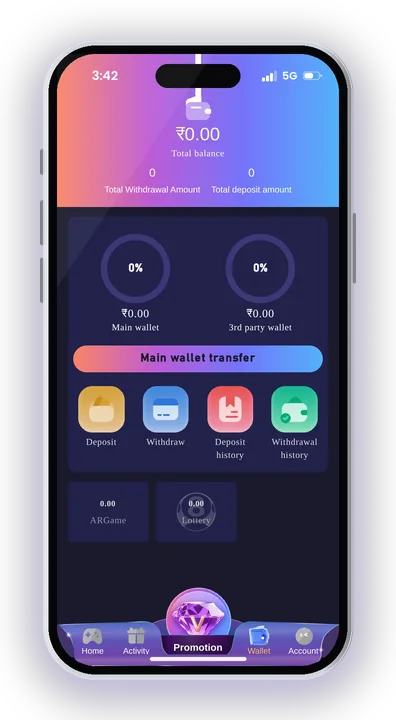
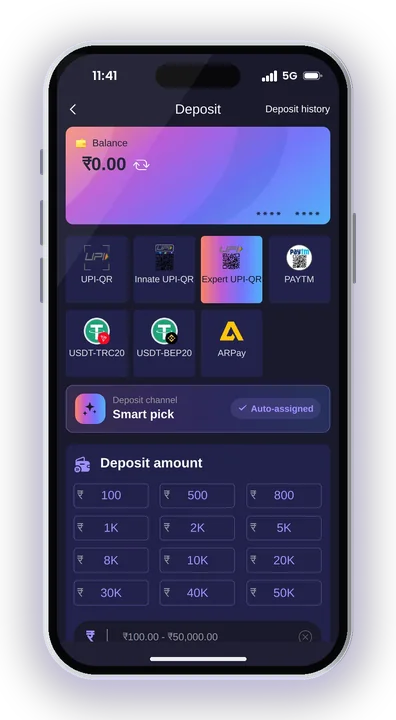
Choose UPI for rupee payments or USDT if you want to pay in crypto.
Type at least Rs. 100 for UPI or $10 for USDT. Stay within ₹50,000 for one UPI order.
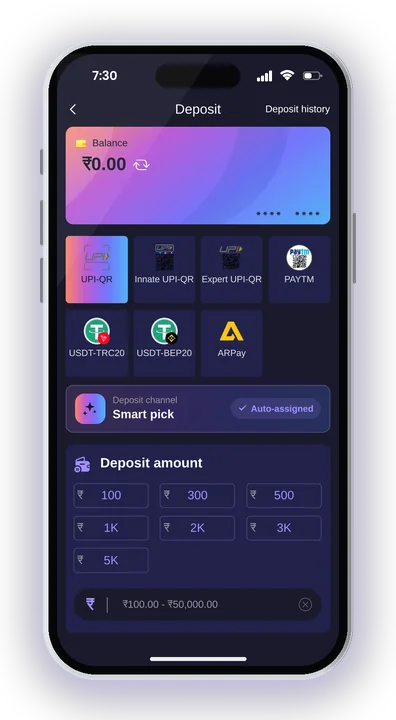
Tap Deposit, scan the QR code shown with your UPI app, and complete the payment. The amount is credited instantly once it is confirmed.
Keep the payment page open until the app confirms. Closing it halfway is the most common reason new players lose track of an order.
Jai Club Minimum And Maximum Deposit Limits
The lowest amount you can add on the Jai Club deposit page is Rs. 100 by UPI, while USDT needs at least 10 USDT. Anything below these numbers is either blocked at the order stage or, in the case of USDT, simply not credited.
| Method | Minimum deposit | Maximum per order | Credit time |
|---|---|---|---|
| UPI (QR scan) | Rs. 100 | ₹50,000 | Instant after payment |
| USDT | $10 (10 USDT) | Check the app for the current limit | After network confirmation |
Want to add more than ₹50,000 by UPI? Split it into two separate orders. Each one gets its own QR code, and you should pay each QR only once.
For a first visit, starting near the minimum is sensible. You get to see how fast the credit arrives before you put in a bigger amount.
Paying With UPI: Paytm, PhonePe Or Google Pay
UPI is the easiest way to add money here. The Jai Club deposit payment page shows several QR options, but all of them do the same thing: you scan the code and pay from any UPI app such as Paytm, PhonePe or Google Pay.
Match The Exact Order Amount
The rupee amount you send must be exactly the same as the order you created. If you pay even slightly more or less than the order amount, the system cannot match it, and the money will not be credited automatically.
Also, never cancel the order after you have already paid. The cancelled order cannot be matched to your transfer, and sorting it out then takes a Customer Care ticket.
Do Not Use Your Phone Number As UPI ID
The platform asks players not to use their mobile number as their UPI ID. Use the bank-style handle your UPI app gives you instead. This keeps your number private and avoids mismatches when the payment is checked.
Use A Fresh QR For Every Payment
Each QR code belongs to one order. Saving a screenshot of an old code and paying it again later is a common mistake, and that payment has no live order to land in. Always tap Deposit again and scan the new code.
How A USDT Deposit Works On Jai Club
A USDT deposit needs at least 10 USDT. Anything less will not be credited at all, and that money is very hard to recover, so check the figure twice before you send the payment.
On the Jai Club deposit payment page, choose USDT, enter the amount, and copy the wallet address shown. Send the coins from your crypto wallet on the same network shown on the page, for example the Tron network. Sending on a different network is the costliest crypto mistake players make.
Unlike UPI, crypto has to wait for blockchain confirmation before the balance updates. If it does not show straight away, wait a short while before you raise a deposit ticket. Keep the transaction hash (TxID) from your wallet, because Customer Care will ask for it.
Jai Club Deposit Not Credited: What To Do
If money has left your bank but your Jai Club Balance has not changed, raise a Deposit Not Receive ticket from Customer Care inside the app for your Jai Club deposit. Do not make a second payment hoping the first one will appear.
Check These Three Things First
Start by checking your UPI app to see that the payment status reads successful rather than pending. After that, compare the amount paid with your order, which must match down to the rupee. Lastly, confirm that you didn’t cancel the order on the deposit page once the payment was done.
A UPI payment stuck as pending at the bank usually settles on its own or returns to your account. That is a bank delay, not a platform one.
How To Raise A Deposit Ticket
Go to the Account tab, scroll down and open customer service. Read the FAQs, then pick Deposit Not Receive and submit your details with the UTR number or USDT TxID and a screenshot of the successful payment.
Support works 24/7. After a few hours, tap the progress query button to see the reply on your request.
Ignore Links From So-Called Support
Real customer service never sends links to members. If someone on WhatsApp or Telegram sends a link to “fix” your deposit, do not click it. Raise every payment issue only from inside your account.
Deposit Bonus Offers Linked To Your First Recharge
Your first recharge can bring extra rewards. The First Deposit Bonus goes up to Rs. 488 depending on how much you add, and there is a separate Recharge Bonus for new players making their first Jai Club deposit.
New users also get a first deposit negative profit bonus. If your first Jai Club deposit ends in a loss within 12 hours, the platform returns 35% of it as a bonus. The activity list also carries a Cumulative 10 Days Recharge Bonus.
Bonuses come with their own conditions. Before you withdraw, your total bet must be 0 on the Withdraw page, so read each deposit offer in the Activity tab before you rely on it. The amounts can change, so always check the app for the current values.
Safe Deposit Tips And Jai Club Hack Warnings
Fix your spending limit before you open the Jai Club deposit page, not after a losing round. Results in Win Go, K3 or Aviator are completely random, and adding more money does nothing to change them.
Set A Budget And Keep Bets Small
Decide one amount for the week, such as ₹500, and do not add more once it is gone. Small bets make that budget last, and taking breaks helps you avoid chasing losses with a fresh recharge.
No Jai Club Hack Or Predictor Works
Any Jai Club Hack, predictor app or modded APK that promises sure wins is a scam. These tools usually ask you to deposit through their own link or share your login, and the money is gone. Use only the real Jai Club App from the website.
Plan Ahead For Withdrawals
Once your first withdrawal account is saved, its name cannot be changed, so deposit only from accounts held in your own name. The minimum withdrawal is Rs. 110, and the withdrawal page lists the timings.
Real-money gaming rules differ across Indian states, so check what applies locally before you deposit. Only players aged 18 and above can use the platform.
Jai Club Deposit – FAQs
What is the minimum deposit on Jai Club?
The minimum is Rs. 100 through UPI and $10 (10 USDT) through USDT. A USDT transfer below 10 USDT is not credited, so always send at least that much.
How long does a Jai Club deposit take?
UPI payments are credited instantly once the payment succeeds. USDT can take a little longer because it needs blockchain confirmation first.
Can I deposit more than ₹50,000 at once?
A single UPI order goes up to ₹50,000. For a larger amount, create separate orders and pay each new QR code only once.
Do I need an account to add money?
Yes. Use the Jai Club Register page with invite code 385987864126, log in, and the Deposit option appears in your Wallet.
Final Words
Adding money to Jai Club is simple: Wallet, Deposit, pick UPI or USDT, pay the exact amount, and the money is credited. Most failed deposits come from wrong amounts, reused QR codes, cancelled orders or USDT below 10 coins, and all of these are easy to avoid.
If something does go wrong, use the Deposit Not Receive ticket and keep your UTR or TxID ready. Play only if you are 18 or older, keep to a fixed budget, and treat every rupee you add as money you might lose.