Jai Club Customer Care Help And Fake Support Warnings
You can raise your jai club customer care request 24/7 from inside the app. You open the Account tab, scroll down to customer service, pick the option that matches your problem and submit it. You get the reply in the same place, under a progress query button. There is no outside email or phone line to hunt for.
Most delays come from two mistakes: players send too little detail, or they trust a stranger on social media who claims to be support. Below you will find the exact path to the help desk, what to include in your request, quick fixes for the usual deposit, withdrawal and login problems, and how to spot a fake agent before you lose money.
Jai Club involves real money, so only adults aged 18 and above should use it. Rules on real-money gaming differ from one Indian state to another, so check what is permitted in your area before you put in any deposit.
How To Contact Jai Club Customer Care In The App?
You reach the help desk from the Account tab after you log in. It works the same way on the Android app and the mobile website, so iPhone and PC users follow the same path in their browser for any Jai Club customer care request.
Open the app or the website and sign in with the mobile number and password you used while registering. If you are unable to enter, see the password section below.
Tap Account in the bottom menu, then scroll down until you see the Service center.
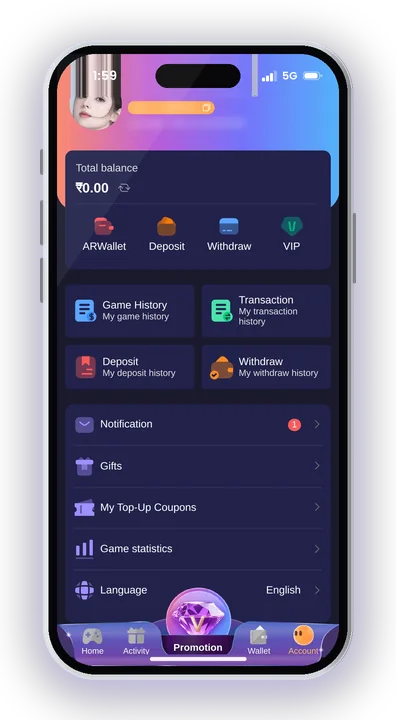
Open Customer Service. Read the FAQs first, because many common doubts are already answered there.
Select the option that matches your issue, such as Deposit Not Receive or Withdrawal Problem. Picking the right one sends your request to the right team.
Enter the details the form asks for, attach proof if asked, and submit.
Come back after a few hours and tap the progress query button to read the reply. Do not send the same request again and again, because that can push you further back in the queue.
If you joined through someone’s referral, there is also an agent line customer service on the Promotion page. It helps with referral and commission questions, but money problems are best sent through the main Customer Service form.
What Details Should You Send To Jai Club Customer Care?
Send your account ID, the exact amount, the order number and a clear screenshot of the payment. A Jai Club customer care request with these four things can be checked straight away. A message like “money not came, please help” usually gets a reply asking for the same details, and you lose half a day.
- Account ID or registered mobile number: This tells the team whose wallet to check. Copy it from your profile so there is no typing mistake.
- Order number: Every deposit and withdrawal creates an order. Copy it from your transaction history and paste it in full.
- Exact amount and time: Write the amount to the rupee and the time you paid or requested the withdrawal.
- UTR or transaction ID: For a UPI deposit, the 12-digit UTR from your UPI app is the strongest proof. For USDT, send the transaction hash.
- A clear screenshot: Show the success screen from your payment app with the date, amount and UTR visible. Cropped or blurry images slow things down.
- One short line on the problem: For example: “Paid ₹500 by UPI today, money debited, wallet balance not updated.”
Never send your login password, OTP or UPI PIN in any support form. The real team does not need them to check a payment.
Jai Club Customer Care Query Options And When To Use Them
The Customer Service page lists fixed query options. Choosing the correct one matters more than writing a long message, because each option in the Jai Club customer care menu goes to the team that handles that problem.
| Query option | Use it when |
|---|---|
| Deposit Not Receive | The amount was debited from your bank or UPI app, yet your wallet balance still shows no change |
| Withdrawal Problem | Your withdrawal is stuck, rejected or not received in your account |
| IFSC Modification | You saved a wrong IFSC code for your bank account |
| Delete Withdraw Bank Account and Rebind | You want to replace the bank account linked for withdrawals |
| Delete UPI and Rebind | You need to change the UPI ID linked to your account |
| Change ID Login Password | You cannot log in and need help resetting your password |
| Change Bank Name | The bank name saved on your account is wrong |
| Delete Old USDT Address and Rebind | You want to replace your saved USDT wallet address |
| Wingo 1Minute Winstreak Bonus | You want to claim or check the Win Go 1 minute winstreak bonus |
| Game Problems | A game round froze, did not load or showed a wrong result on screen |
Note that after your first withdrawal account is saved, the name linked to it is fixed. A rebind request lets you replace the account or UPI ID, but the new one must be in the same name.
Common Jai Club Problems And How To Fix Them
Most support requests come from a handful of repeat problems. Many of them can be fixed by you in a few minutes, and the rest go faster in a Jai Club customer care request when you know which option to pick.
Deposit Debited But Not Added To Wallet
The usual cause is an amount mismatch. The money you send must match the deposit order exactly, and you must not cancel the order after paying. If you created an order for ₹500 and paid a different amount, it will not be credited on its own.
For USDT, anything below 10 USDT is not credited. If your payment was correct, submit Deposit Not Receive with the UTR and screenshot. Read more about adding money with UPI in adding money with UPI before your next payment.
Withdrawal Pending Or Not Received
First check your total bet requirement. Withdraw only opens when the required betting amount shows 0. Also check the time window: UPI and USDT withdrawals run from 00:10 to 23:50, and each method allows 3 withdrawals per day.
The normal transfer time is within 24 hours. If it has crossed that, use Withdrawal Problem with your order number. You can see the full limits and timings on how to withdraw from Jai Club.
Wrong UPI ID Or Bank Details
Withdrawals often fail because of an incorrect IFSC or an outdated UPI ID. Depending on the case, choose IFSC Modification, Delete UPI and Rebind, or Delete Withdraw Bank Account and Rebind. While binding a fresh UPI ID, don’t use your phone number as the ID.
Forgot Password Or Cannot Log In
Begin with Forgot password on the Jai Club login page. Should that fail, submit Change ID Login Password through Customer Service. If you are still able to log in and only wish to set a new password, open Account, then Settings, and edit the login password there. A separate page explains how to sign in step by step.
Does Jai Club Customer Service Send Links? Fake Support Warnings
No. Jai Club customer service never shares links with members, so any message claiming to be from support and containing a link is a scam. Do not open it, even if it displays the logo and looks like a real Jai Club customer care message.
Fraudsters keep an eye on Facebook, Instagram, YouTube comments and Telegram for players complaining about a withdrawal that is stuck. They respond quickly and sound like Jai Club customer care helpers, then demand money or your login details.
Signs Of A Fake Customer Care Agent
A fake agent contacts you first, through WhatsApp, Telegram or a social media DM. The real help desk only answers requests you submit inside the app, and replies appear under the progress query button.
Other red flags: they share a phone number as the “Jai Club India helpline”, ask you to pay a “release fee” or “tax” to unlock a withdrawal, or ask for your OTP, password or UPI PIN. No genuine support team needs any of these.
Jai Club Hack And Predictor Apps Are Scams
There is no working Jai Club hack. Win Go and other rounds give random results, so no app or Telegram group can predict them. Modded APKs and predictor tools are unsafe and can steal your login or payment data.
People who sell these “hacks” often pose as support or agents. If someone offers a sure result for a fee, block them.
What To Do If You Already Clicked A Fake Link
Change your login password at once through Account, then Settings. If you shared your UPI PIN or bank details, contact your bank and change your UPI PIN too. Then raise a request in the app so the team knows your account may be at risk.
Where To Find Real Jai Club Customer Care Online?
Real Jai Club Customer Care exists only inside your account: the Service center under the Account tab, and the agent line on the Promotion page. There is no public customer care email or phone number, so any number you find in a YouTube comment or Google search result should not be trusted.
Download the Android app only from the download button on the website, not from a link sent in chat. The Jai Club app is not on the Google Play Store, which is exactly why fake APK files spread through groups. iPhone and PC users should open the website in their browser and use the same Account path to reach Jai Club customer care.
Jai Club is the place to begin for the download button, the Jai Club register steps and the invite code. Gift codes are also something fake agents abuse. Genuine ones come from your superior agent and are redeemed under Account, then the gift button, then Receive. Nobody should be paid for a code.
Tips To Get Faster Help From Jai Club Customer Care
Small habits before and after you play stop most support problems from happening at all.
Save Proof Of Every Payment
Take a screenshot of the UPI success screen every time you deposit, before you close the payment app. Note the order number too. With proof ready, a Deposit Not Receive request takes you under a minute to fill.
Check Your Details Before You Withdraw
Confirm your bank name, IFSC and UPI ID once before your first withdrawal. Since the account holder name gets locked, a wrong name at the start creates trouble for every withdrawal after that.
Keep A Fixed Playing Budget
Every game result is random, and the money you deposit can be lost. Decide a budget you can comfortably spend, keep bets small, pause now and then, and never try to win back losses. Customer care can correct payment errors but cannot undo rounds you have lost. Play only if you are 18 or above.
Jai Club Customer Care – FAQs
Is Jai Club customer care available 24/7?
Yes, support runs round the clock through the Customer Service page under the Account tab. Replies usually show up under the progress query button after a few hours, so check back instead of sending repeat requests.
Is there a Jai Club customer care phone number or WhatsApp?
No public phone number or email is listed. All help goes through the in-app Customer Service form and the agent line on the Promotion page. Anyone giving you a WhatsApp or phone “helpline” is not the real support team.
Why did support not credit my deposit?
Usual causes are paying an amount that differs from the order, cancelling the order after payment, or sending under 10 USDT. Submit Deposit Not Receive along with your UTR, order number and a clear screenshot, so the team can trace the payment.
Can customer care ask for my OTP or password?
No. The real team never asks for your OTP, login password or UPI PIN, and never sends links. If someone does, it is a scam. Change your password and report it in the app.
Final Words
The safest way to get help is also the simplest: Account tab, Customer Service, the right query option, and a request with your order number, amount and UTR. Then wait for the reply under progress query instead of looking for shortcuts on social media.
Real support will never send you links, ask for your OTP or charge a fee to release a withdrawal. Set a fixed budget for playing, play only if you are 18 or above, and check your state’s rules on real-money gaming. For downloads and the basics of your account, go back to Jai Club for Indian players.